
Sudoku for kids
Easy 4×4 and 6×6 sudoku for kids — play with pictures or numbers, online or printed as a worksheet. Suitable from around age 4 (pictures) or age 7 (numbers).
Choose Pictures mode and pick a symbol set (animals, fruit, colors, vehicles or weather), or switch to Numbers mode for a simple 4×4 number sudoku where children learn to play with digits. Pick a grid size and tap a cell to fill in a picture or digit. Each symbol may appear only once per row, column and block. Use the hint button if you get stuck, switch error checking on or off, and print as PDF for school or home use.
Download
How does sudoku work?
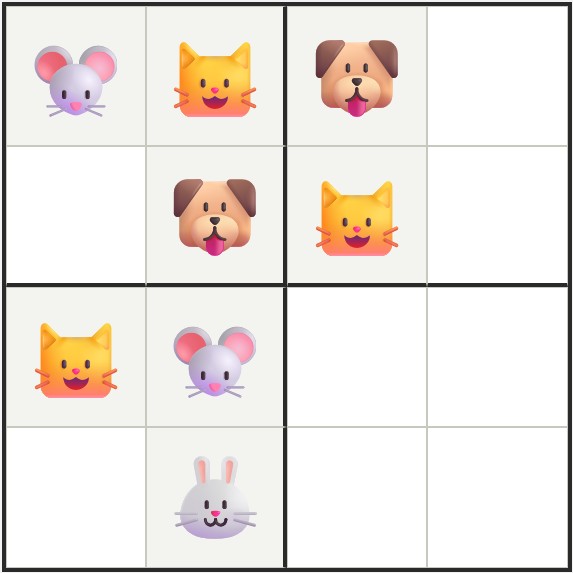
Sudoku is a logic puzzle you can play online or print out. Our kids sudoku works with pictures (for children from age 4) or numbers (for children from age 7), in two sizes: 4×4 (with 2×2 blocks) and 6×6 (with 2×3 blocks).
The rules
- Each picture may appear only once in each row.
- Each picture may appear only once in each column.
- Each picture may appear only once in each block.
How to solve it
- Start with cells where only one picture fits.
- Look at which pictures are already in the row, column or block.
- See a mistake? The error check shows it right away.
- Stuck? Click the hint button for help.
How to play sudoku with pictures
- Choose the size. Pick 4×4 with 4 pictures (good for ages 4-6) or 6×6 with 6 pictures (good for ages 6+). Start with 4×4 if your child is new to sudoku.
- Choose pictures or numbers, and pick a set. First pick Pictures mode for emoji symbols, or Numbers mode for a simple digit-based 4×4 number sudoku (good for kids learning numbers, around age 7). In Pictures mode, then pick one of five sets: Animals, Fruit, Colors, Vehicles or Weather.
- Click "New game". A new puzzle appears, with some pictures already placed. The goal: fill every empty cell so that each picture appears once per row, once per column and once per block.
- Tap a cell and choose a picture. Click an empty cell and then tap the picture that fits. With "Error check" turned on (default), a wrong picture turns red right away — so your child can correct themselves.
- Need help? Use the Hint button. Done? Download as PDF.. Stuck? Click "Hint" for a tip. Finished and want to print it? Click "Download PDF" to save the puzzle as an A4 sheet for paper play.
Frequently asked questions
What age is sudoku for kids suitable from?
Children can play sudoku from around 4 years old using the 4×4 version, once they recognise and sort pictures. Specifically by age: 4-5 years can do 4×4 with pictures; 6-7 years can move to 6×6 with pictures; from 7-8 years children can usually handle the classic 4×4 or 6×6 with digits; from 8-9 years the 9×9 grid is within reach. Our kids sudoku supports both pictures and numbers via the Mode toggle: pictures (animals, fruit, colors, vehicles, weather) for preschoolers who cannot yet count, and digits 1-4 or 1-6 for children around age 7+. The classic 9×9 sudoku on this site is the natural next step once 6×6 with digits feels easy.
What does my child learn from sudoku?
Sudoku trains several skills at once: logical reasoning ("if a dog is already here, there cannot be another dog in this row"), pattern recognition (seeing which pictures are missing), concentration (finishing a puzzle takes focus), perseverance and visual attention (telling different pictures apart). For preschoolers, sudoku also lays groundwork for later number work — the same logic applies to digits 1-9 in the classic sudoku.
How do I explain sudoku to a preschooler?
Start with one picture at a time. Point at a row and say: "There is no car in this row yet. Where could the car go?" Let the child search. Work together at first and point out which rows, columns and blocks matter. Begin with 4×4 — it fits in a single glance — and only move on to 6×6 once the child handles 4×4 on their own. Keep Error check on (default): your child sees right away if a picture is wrong, without you having to check.
Why pictures instead of digits for young children?
Digits are still abstract for 4-5 year olds — many children recognise them, but the symbolic value ("3 is more than 2") comes later. With pictures (a dog, a banana, a red ball), sudoku becomes a purely visual-logical game: the child does not need to know digits first to understand the logic. Once the child is older and digits are second nature (around 7-8), switch the Mode toggle to Numbers on this same page to play with digits — the same simple sudoku, now with numbers.
Can my child also play with numbers instead of pictures?
Yes — there is a Mode toggle above the board with Pictures and Numbers. Pictures is the default and suitable from age 4. From around age 7 children recognise digits well enough to play in Numbers mode: the same 4×4 or 6×6 puzzle, but with digits 1-4 (in 4×4) or 1-6 (in 6×6) instead of pictures. A 4×4 number sudoku is a calm first step for children who are just learning numbers, before moving on to the classic 9×9 sudoku. The choice is remembered, so next time your child returns the mode they used last is automatically set.
What is the difference between 4×4 and 6×6 sudoku for kids?
4×4: 16 cells in 2×2 blocks, with 4 different pictures. Fits on one screen without scrolling. A 5-year-old usually takes 2-5 minutes. Good starting point. 6×6: 36 cells in 2×3 blocks, with 6 different pictures. Demands more overview and concentration. Suitable from 6-7 years on, or once the child solves 4×4 on their own in a few minutes. Both sizes are always at easy level (the tool picks this automatically — no difficulty choice for kids).
Which picture sets can my child choose?
There are 5 sets available: Animals (cat, dog, cow, …), Fruit (apple, banana, grape, …), Colors (red, blue, yellow, …), Vehicles (car, plane, boat, …) and Weather (sun, rain, cloud, …). Your child can pick a different set for each new puzzle — variety keeps it fun. The sets automatically match the size: 4×4 shows 4 pictures, 6×6 shows 6.
How long does a kids sudoku take on average?
Depends on age and experience. A 5-year-old takes about 2-5 minutes on a 4×4. 6-7-year-olds often solve 4×4 in 1-2 minutes and 6×6 in 3-6 minutes. The short duration is intentional: a focused activity of 5-10 minutes fits the attention span of young children. Better several short sessions than one long one — start a new puzzle with the "New game" button.
Can I print these sudokus for school or at home?
Yes — click "Download PDF" to save the current puzzle as an A4 PDF. Print and hand it to your child or class. Useful for: at home on the couch without a screen, in a waiting room, in classroom worksheets, or for children who prefer paper and pencil. One puzzle per PDF on A4 format. For multiple puzzles per page, our classic sudoku generator (digit-based) is a better fit.
Can I reuse or laminate these sudokus?
Yes, and this is a popular approach for teachers and at home. Laminate the printed PDF and your child can fill it in with a whiteboard marker or erasable pen. Wipe it clean afterwards and the puzzle is reusable. Ideal for the classroom (one laminate per child, reusable for weeks), in the car or on holiday. Alternative: just print multiple times — our generator creates a new puzzle each time with the same picture set.
Can my child solve it independently or do I need to help?
In the beginning (4-5 years) solving together works best — explain the rules, point at rows and blocks, give hints in your own words. From around 6 years on many children handle 4×4 on their own. The built-in Error check (default on) helps a lot: a wrong picture turns red immediately so the child can correct themselves. The Hint button gives a tip when your child is really stuck, without you needing to sit next to them.
Is sudoku for kids free?
Yes, sudoku for kids is completely free, no account is needed, and there is no limit on the number of puzzles you can generate or print. It works on desktop, tablet and phone — a tablet is usually the most child-friendly option for young children.