From text to word search: automatically extract keywords
March 5, 2026 — Colorpix
Since recently, there’s an extra option on the word search page: you can now extract keywords from a text. Useful if you’re working in class with a text from a book, a worksheet, a news snippet, or a theme corner, and you want to quickly make a word search from it.
What does this feature do exactly?
You paste a short piece of text into the text box (up to 1200 characters) and choose how many keywords you want to extract. The system then automatically pulls the most important words from the text.
Those words are immediately used for the word search:
- The keywords become the words hidden in the grid
- You don’t have to figure out yourself which words fit well
- You get a word search faster that matches the class text
Why this is useful in class
In practice it often goes like this: you discuss a text, you want to repeat the key words, and you want to add a short activity. With this option you can do that quickly without much preparation.
How to use it
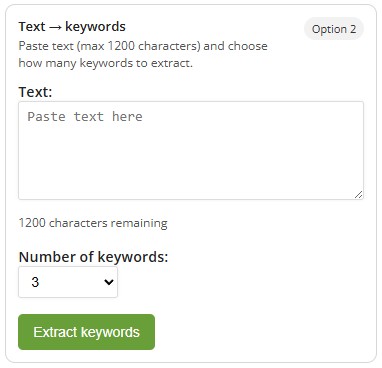
- Go to the word search page
- Choose the option Text → Keywords (text to keywords)
- Paste your text (max. 1200 characters)
- Choose the number of keywords
- Extract the keywords and generate the word search
Free
This feature is free to use. So you can quickly create a word search based on your own lesson material or a text you just covered, without an account or any hassle.
Practical tip
If you notice words you don’t want (e.g. names or words that are too long), you can shorten or tweak the text and run it again. That often gives you a better set of keywords for your class.